YOMP vs MyFitnessPal: Which Photo Tracking App is Better? (2024 Comparison)
Compare YOMP vs MyFitnessPal for AI photo calorie tracking. See which app is faster, more accurate, and completely free. No subscription required—start tracking today!
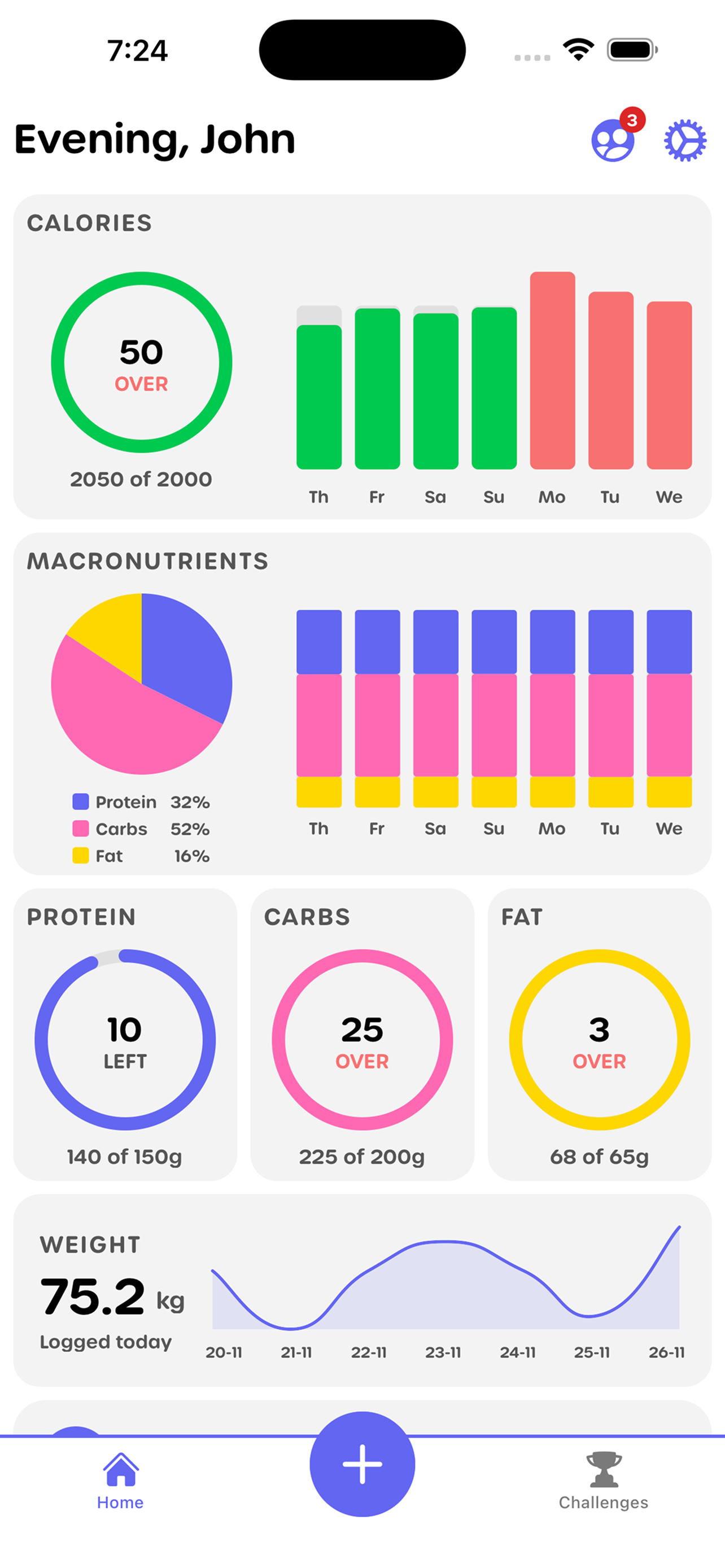
Photo-based calorie tracking is revolutionizing how people monitor their nutrition. Instead of manually searching databases and entering every ingredient, you simply take a photo of your meal and let AI estimate the calories and macros automatically. It's faster, more convenient, and surprisingly accurate.
Two popular apps in this space are YOMP and MyFitnessPal. Both offer photo tracking capabilities, but they approach it differently. This comprehensive comparison will help you understand which app is better suited for photo-based calorie tracking based on your needs, preferences, and goals.
Understanding Photo-Based Calorie Tracking
Before comparing the apps, it's important to understand what photo tracking is and how it works.
How Photo Tracking Works
The Technology
- AI and machine learning analyze food photos
- Visual recognition identifies foods and portions
- Algorithms estimate calories and macros
- Users can review and adjust estimates
- Accuracy improves over time
The Process
- Take a photo of your meal
- Upload to the app
- AI analyzes and estimates nutrition
- Review and adjust if needed
- Save and track
Advantages
- Much faster than manual entry
- Works with any food, anywhere
- No need to search databases
- Visual food diary
- Less mental effort required
Why Photo Tracking Matters
Convenience
- Saves significant time
- Reduces tracking friction
- Works in restaurants
- No barcode scanning needed
- Fits into busy lifestyles
Accuracy
- Visual records are more accurate than memory
- Portion estimation can be quite good
- AI improves with more data
- User adjustments refine estimates
- Better than guessing
Sustainability
- Easier to maintain long-term
- Less overwhelming
- More enjoyable process
- Reduces tracking burnout
- Higher adherence rates
YOMP: Photo-First Approach
YOMP is designed specifically around photo-based tracking, making it a natural fit for users who want to track calories without manual entry.
Photo Tracking Features
Core Functionality
- Primary tracking method is photos
- AI-powered food recognition
- Automatic calorie and macro estimation
- Visual food diary
- Quick photo capture
User Experience
- Simple, intuitive interface
- Fast photo processing
- Easy to review and adjust
- Clean, modern design
- Focus on ease of use
Accuracy
- AI trained on diverse food database
- Portion size recognition
- User feedback improves accuracy
- Adjustable estimates
- Learning algorithm
Strengths of YOMP
Photo-Centric Design
- Built for photo tracking from ground up
- Interface optimized for photos
- Fast, streamlined process
- Visual-first approach
- Minimal manual entry needed
User-Friendly
- Simple and intuitive
- Low learning curve
- Quick to use
- Less overwhelming
- Focused feature set
Social Features
- Challenge creation and participation
- Social fitness tracking
- Community engagement
- Friend connections
- Group accountability
Fitness Integration
- Workout tracking
- Step counting
- Challenge participation
- Comprehensive fitness platform
- Holistic health tracking
Limitations of YOMP
Smaller Food Database
- Less extensive than MyFitnessPal
- May need manual entry for some foods
- Fewer restaurant options
- Limited barcode scanning
- Newer platform
Fewer Advanced Features
- Less detailed nutrition analysis
- Fewer integrations
- Simpler reporting
- Basic meal planning
- Focused on core features
MyFitnessPal: Comprehensive Platform
MyFitnessPal is the established leader in calorie tracking, with a massive food database and extensive features, including photo tracking capabilities.
Photo Tracking Features
Barcode Scanner Integration
- Scan barcodes for packaged foods
- Photo recognition for meals
- Combines both methods
- Extensive database
- High accuracy for packaged items
Food Database
- Over 14 million foods
- Extensive restaurant menus
- User-contributed entries
- International foods
- Constantly updated
Manual Entry Options
- Detailed manual entry
- Recipe builder
- Meal planning
- Custom foods
- Extensive customization
Strengths of MyFitnessPal
Massive Database
- Largest food database available
- Restaurant menus included
- International options
- User contributions
- Constantly expanding
Advanced Features
- Detailed nutrition analysis
- Meal planning tools
- Recipe calculations
- Macro and micronutrient tracking
- Extensive reporting
Integrations
- Connects to many fitness devices
- Syncs with other apps
- Wearable integration
- Comprehensive ecosystem
- Data portability
Established Platform
- Long track record
- Proven reliability
- Large user base
- Extensive support
- Regular updates
Limitations of MyFitnessPal
Complexity
- Can feel overwhelming
- Steep learning curve
- Many features to navigate
- May be more than needed
- Information overload
Photo Tracking
- Not the primary focus
- Photo features less polished
- More manual entry required
- Less streamlined for photos
- Traditional entry still dominant
User Interface
- Dated design in some areas
- Cluttered interface
- Advertisements (free version)
- Less modern feel
- Can be slow
Head-to-Head Comparison
Photo Tracking Accuracy
YOMP
- AI optimized for photo recognition
- Focused on visual estimation
- Good portion size recognition
- User adjustments improve accuracy
- Learning algorithm
MyFitnessPal
- Photo recognition available
- Strong for packaged foods (barcode)
- Less accurate for complex meals
- Relies more on manual entry
- Database strength helps
Winner: YOMP - Photo tracking is its core feature and primary focus
Speed and Convenience
YOMP
- Very fast photo capture
- Quick processing
- Minimal steps required
- Streamlined workflow
- Optimized for speed
MyFitnessPal
- Slower photo process
- More steps involved
- Manual entry often needed
- More time-consuming
- Comprehensive but slower
Winner: YOMP - Designed for quick, convenient photo tracking
Food Database Size
YOMP
- Smaller but growing database
- Focused on common foods
- May need manual entry sometimes
- Less restaurant coverage
- Newer platform
MyFitnessPal
- Massive 14+ million food database
- Extensive restaurant menus
- International coverage
- User contributions
- Most comprehensive available
Winner: MyFitnessPal - Unmatched database size and coverage
User Experience
YOMP
- Clean, modern interface
- Intuitive and simple
- Easy to learn
- Focused design
- Less overwhelming
MyFitnessPal
- More complex interface
- Steeper learning curve
- Feature-rich but cluttered
- Can be overwhelming
- More to navigate
Winner: YOMP - Simpler, more intuitive user experience
Social and Community Features
YOMP
- Built-in challenge system
- Social fitness tracking
- Friend connections
- Group challenges
- Community engagement
MyFitnessPal
- Basic social features
- Friend connections
- Less emphasis on challenges
- More individual-focused
- Limited community features
Winner: YOMP - Stronger social and challenge features
Fitness Integration
YOMP
- Comprehensive fitness tracking
- Workout logging
- Step counting
- Challenge participation
- Holistic health platform
MyFitnessPal
- Basic exercise tracking
- Extensive device integrations
- Third-party app connections
- More integration options
- Less built-in fitness features
Winner: Tie - YOMP has better built-in features, MyFitnessPal has more integrations
Cost and Value
YOMP
- Free core features
- Premium options available
- Good value for photo tracking
- Focused feature set
- Affordable pricing
MyFitnessPal
- Free version with ads
- Premium subscription available
- More features in premium
- Higher cost for full features
- Good value for comprehensive tracking
Winner: YOMP - Better value for photo tracking specifically
Use Case Scenarios
Best For YOMP
Photo-First Users
- Want primarily photo tracking
- Prefer simplicity
- Value speed and convenience
- Don't need extensive database
- Focus on visual tracking
Social Fitness Enthusiasts
- Enjoy challenges
- Want community features
- Like group accountability
- Prefer social engagement
- Value fitness community
Simplicity Seekers
- Want easy-to-use app
- Prefer focused features
- Don't need advanced tools
- Value user experience
- Want less complexity
Fitness-Focused Users
- Track workouts and nutrition
- Participate in challenges
- Want integrated platform
- Value social features
- Holistic health tracking
Best For MyFitnessPal
Comprehensive Trackers
- Need extensive food database
- Want detailed nutrition analysis
- Value advanced features
- Need meal planning tools
- Want comprehensive platform
Manual Entry Users
- Prefer detailed logging
- Want recipe calculations
- Need custom food entries
- Value precision
- Don't mind complexity
Integration Needs
- Use multiple fitness devices
- Want app integrations
- Need data portability
- Use other health apps
- Value ecosystem connections
Established Users
- Already using MyFitnessPal
- Have historical data
- Familiar with interface
- Established routines
- Don't want to switch
Photo Tracking Comparison Details
YOMP Photo Tracking
How It Works
- Open app and tap camera icon
- Take photo of meal
- AI analyzes and estimates
- Review calories and macros
- Adjust if needed and save
Features
- Instant photo capture
- AI food recognition
- Automatic portion estimation
- Macro breakdown
- Visual food diary
- Quick adjustments
Accuracy
- Good for common meals
- Estimates improve with use
- User feedback refines
- Portion recognition decent
- Best for whole meals
User Experience
- Very fast and simple
- Minimal steps
- Clean interface
- Easy to review
- Streamlined process
MyFitnessPal Photo Tracking
How It Works
- Open app and select add food
- Choose photo option
- Take or upload photo
- AI suggests foods from database
- Select from suggestions or search
- Adjust portions manually
- Save entry
Features
- Photo recognition
- Database matching
- Barcode scanning integration
- Manual entry options
- Recipe builder
- Detailed logging
Accuracy
- Strong for packaged foods
- Database matching helps
- Less accurate for complex meals
- Relies on user selection
- Better with manual input
User Experience
- More steps involved
- Slower process
- More manual work
- Comprehensive but complex
- Traditional entry still primary
Accuracy Comparison
Photo Recognition Accuracy
YOMP
- Optimized AI for photos
- Good visual recognition
- Portion estimation decent
- Improves with feedback
- Best for whole meals
MyFitnessPal
- Photo recognition available
- Database matching strong
- Less visual estimation
- More manual selection
- Better for packaged items
Portion Size Estimation
YOMP
- Visual portion recognition
- Estimates based on photo
- User can adjust easily
- Learning algorithm
- Good for common portions
MyFitnessPal
- Less visual estimation
- More manual portion entry
- Database portion data
- User selects portions
- More precise but manual
Overall Accuracy
YOMP
- Good for photo-based tracking
- Estimates are reasonable
- User adjustments improve
- Best for convenience
- Acceptable accuracy for speed
MyFitnessPal
- More accurate with manual entry
- Database strength helps
- Better for precision
- Requires more effort
- Higher accuracy potential
User Experience Comparison
Ease of Use
YOMP
- Very intuitive
- Quick to learn
- Simple workflow
- Minimal friction
- User-friendly
MyFitnessPal
- More complex
- Steeper learning curve
- More features to learn
- Can be overwhelming
- Powerful but complex
Speed of Tracking
YOMP
- Very fast photo capture
- Quick processing
- Minimal time required
- Streamlined process
- Optimized for speed
MyFitnessPal
- Slower process
- More steps involved
- More time required
- Comprehensive but slower
- Detailed but time-consuming
Interface Design
YOMP
- Modern, clean design
- Intuitive layout
- Focused interface
- Less cluttered
- Contemporary feel
MyFitnessPal
- Functional but dated
- More cluttered
- Information dense
- Less modern
- Feature-rich but busy
Pricing Comparison
YOMP Pricing
Free Version
- Core photo tracking
- Basic features
- Social features
- Challenge participation
- Good functionality
Premium Options
- Additional features
- Advanced analytics
- Enhanced social features
- Priority support
- Reasonable pricing
MyFitnessPal Pricing
Free Version
- Basic tracking
- Advertisements
- Limited features
- Core functionality
- Database access
Premium Subscription
- Ad-free experience
- Advanced features
- Detailed analytics
- Meal planning
- Higher cost
Final Verdict
Choose YOMP If:
- Photo tracking is your primary method
- You value speed and convenience
- You prefer simplicity
- You want social and challenge features
- You're focused on fitness tracking
- You want a modern, intuitive interface
- You don't need the largest database
Choose MyFitnessPal If:
- You need the largest food database
- You prefer detailed manual entry
- You want advanced nutrition analysis
- You need extensive integrations
- You use multiple fitness devices
- You want meal planning tools
- You're already established on the platform
Conclusion
For photo-based calorie tracking specifically, YOMP is the better choice. It's designed from the ground up for photo tracking, offers a faster and more convenient experience, and provides a simpler, more intuitive interface. If your primary goal is to track calories using photos with minimal effort, YOMP excels.
However, MyFitnessPal remains the better choice if you need the most comprehensive food database, want detailed nutrition analysis, prefer manual entry with photo support, or need extensive integrations with other apps and devices.
The best app for you depends on your priorities. If photo tracking convenience is your main concern, YOMP wins. If you need comprehensive features and the largest database, MyFitnessPal is still the leader.
Both apps are excellent tools—they just serve different needs and preferences. Consider what matters most to you: speed and simplicity for photo tracking (YOMP) or comprehensive features and database size (MyFitnessPal).
Ready to try photo-based calorie tracking? Download YOMP and experience the fastest, most convenient way to track your nutrition. Our app is designed specifically for photo tracking, making it easier than ever to monitor your calories without the hassle of manual entry.
Key Takeaways:
- YOMP excels at photo-based tracking with faster, more convenient photo capture and processing
- MyFitnessPal offers the largest food database and most comprehensive features
- YOMP provides better user experience for photo tracking specifically
- MyFitnessPal is better for users who need extensive database and advanced features
- YOMP has stronger social and challenge features
- MyFitnessPal offers more integrations with fitness devices and apps
- Choose YOMP for photo-first tracking convenience
- Choose MyFitnessPal for comprehensive nutrition tracking with extensive database
- Both apps are excellent—choose based on your priorities and preferences
- Photo tracking accuracy is good in both, but YOMP is optimized for this use case
Next Steps:
- Identify your primary tracking method (photo vs manual)
- Consider your need for database size
- Evaluate importance of social features
- Assess your integration needs
- Try both apps if unsure
- Choose based on your priorities
- Start tracking and adjust as needed
Remember, the best app is the one you'll actually use consistently. If photo tracking is your priority, YOMP offers the best experience. If you need comprehensive features and database, MyFitnessPal remains the leader.